

Business intelligence exercises grab attention. They help you master data-driven decisions. Companies use business intelligence (BI) to analyze data and improve strategies. BI exercises teach you to clean, model, and visualize data effectively. Over 70% of companies now rely on BI tools for decision-making (Forbes, 2023). The U.S. Bureau of Labor Statistics predicts a 10% growth in data-related jobs by 2030. Ready to dive into BI? Let’s explore practical exercises to sharpen your skills.
What Are Business Intelligence Exercises?
Business intelligence exercises are hands-on tasks. They teach you to work with data. You learn to use BI tools like Power BI, Qlik Sense, or SAP BusinessObjects. These exercises focus on data analysis, visualization, and reporting. They mimic real-world business scenarios. You solve problems like predicting customer churn or optimizing inventory management.
Why Practice BI Exercises?
BI exercises build critical skills. They help you understand data sources and create data models. You gain confidence in tools like Power Query and SQL Server. Here’s why they matter:
- Improve decision-making: Practice makes you better at spotting trends.
- Boost career growth: Companies value BI skills for roles like business analyst.
- Simplify complex data: Exercises teach you to create clear visual insights.
Getting Started with Business Intelligence Exercises
Start small. Choose exercises that match your skill level. Focus on key BI areas: data collection, data cleaning, data modeling, and visualization. Below, we break down beginner, intermediate, and advanced exercises.
Beginner BI Exercises
New to BI? These exercises build foundational skills.
- Data Cleaning with Power Query
Import an Excel spreadsheet with messy data. Use Power Query to remove duplicates. Fix missing values. Standardize text formats. This teaches data cleansing basics.
Example: Clean a customer dataset with inconsistent names (e.g., “John Doe” vs. “john doe”). - Basic SQL Queries
Write simple SQL queries to filter data. Use a sample dataset from SQL Server. Practice SELECT, WHERE, and GROUP BY clauses.
Example: Query a sales database to find total revenue by region. - Create a Simple Dashboard in Power BI
Connect to a data source like Google Sheets. Build a bar chart to show sales trends. Add a filter for time periods. This introduces data visualization.
Example: Visualize monthly sales for a retail store.
Intermediate BI Exercises
Ready for more? These exercises dive deeper into BI tools and techniques.
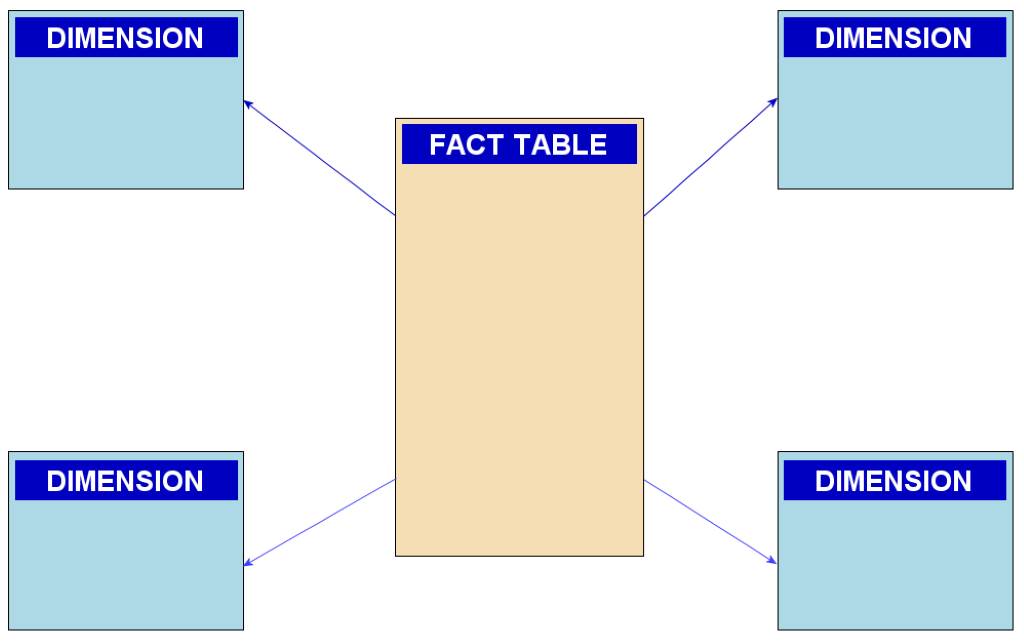
- Build a Star Schema
Create a star schema with fact and dimension tables. Use a dataset with sales data. Link a fact table (sales) to dimension tables (products, time). This teaches data modeling.
Example: Model a retail dataset with sales, products, and dates. - Predictive Analytics with Excel
Use Excel to forecast sales trends. Apply trendlines to historical data. This introduces predictive modeling.
Example: Predict next quarter’s revenue based on past sales. - Data Storytelling with Qlik Sense
Build a dashboard in Qlik Sense. Use charts to tell a story about customer behavior. Focus on clear visuals and insights.
Example: Show how customer churn risks vary by region.
Advanced BI Exercises
Challenge yourself with complex BI tasks. These mimic real-world projects.
- Build a Data Warehouse
Design a cloud-based data warehouse. Use Microsoft Fabric or SQL Server. Create tables for CRM data. Write queries to aggregate data. This teaches data warehousing.
Example: Store and query customer data for a marketing campaign. - Implement Row-Level Security
Use Power BI to set up row-level security. Restrict data access based on user roles. This ensures data privacy.
Example: Limit sales data access to regional managers. - Financial Modeling with Machine Learning
Use machine learning tools to predict market changes. Train a model with historical financial data. Test its accuracy. This combines BI with predictive analysis.
Example: Forecast stock prices for a retail company.
Tools for Business Intelligence Exercises
BI exercises rely on powerful tools. Here’s a quick look at the most popular ones:
- Power BI: Great for dashboards and data visualization. Easy to connect to data sources.
- SQL Server: Ideal for writing SQL queries and managing relational databases.
- Qlik Sense: Perfect for data storytelling and interactive visuals.
- Excel: Useful for quick data analysis and financial forecasting.
- Microsoft Fabric: A modern platform for hybrid data warehouses.
Pro Tip: Start with free tools like Microsoft Learn or Google Sheets for practice. Explore What Are the Key CMMC Requirements for Achieving Level 2 Compliance?
Real-World Applications of BI Exercises
BI exercises prepare you for real business challenges. Here are some examples:
- Inventory Management: Analyze stock levels to reduce waste. Use Power BI to visualize trends.
- Campaign Management: Track Google Ads performance. Optimize budgets with data insights.
- Stakeholder Management: Create reports for executives. Use data storytelling to present clear findings.
- Process Mapping: Map business processes with BI tools. Identify bottlenecks in workflows.
Case Study: Bragg Live Food Products used BI to optimize its supply chain. By analyzing CRM data, they reduced delivery times by 15% (Business Journal, 2024).
Building a Data Culture with BI Exercises
BI exercises foster a data culture. They encourage teams to make data-driven decisions. Companies like SUNY System Administration use BI exercises in training. Employees learn to analyze student data and improve processes. You can do the same. Practice regularly to build confidence.
Tips for Success
- Start with small datasets: Use sample data from Microsoft Learn or public sources.
- Focus on data quality: Clean data before analysis to avoid errors.
- Practice regularly: Dedicate 1–2 hours weekly to BI exercises.
- Join workshops: Look for self-paced workshops or improv exercises online.
Common Challenges and How to Overcome Them
BI exercises can be tough. Here are common issues and solutions:
- Messy Data: Use Power Query for data cleansing. Remove duplicates and fix formats.
- Complex Tools: Start with Excel before moving to Power BI or Qlik Sense.
- Ethical Concerns: Ensure data privacy. Use row-level security for sensitive data.
- Slow Progress: Break exercises into smaller steps. Focus on one skill at a time.
Resources for BI Exercises
Want to dive deeper? Check these resources:
- Microsoft Learn: Offers free BI tutorials and exercises.
- Boise State College of Business and Economics: Provides BI courses on Brightspace Platform.
- SUNY BI Workshops: Includes videos and exercises for beginners.
- QlikView/Qlik Sense Guides: Great for advanced data visualization.
Conclusion
Business intelligence exercises build critical skills. They help you clean, model, and visualize data. From Power BI dashboards to SQL queries, these tasks prepare you for real-world challenges. Practice regularly to master BI tools. Start today with a simple exercise. Your data skills will soar.
Try a beginner BI exercise now! Download a sample dataset from Microsoft Learn and build your first Power BI dashboard.
FAQs
What Are the Best Tools for BI Exercises?
Power BI, SQL Server, and Qlik Sense are top choices. Excel works for beginners.
How Do I Start Learning BI?
Begin with free resources like Microsoft Learn. Practice data cleaning and visualization.
Why Is Data Cleaning Important in BI?
Clean data ensures accurate analysis. It removes errors and inconsistencies.
Can BI Exercises Help with Career Growth?
Yes. BI skills are in demand for roles like business analyst and data scientist.
How Long Does It Take to Master BI Exercises?
With regular practice, you can gain confidence in 3–6 months.
References:
- Forbes: https://www.forbes.com/sites/bernardmarr/2023/05/10/the-rise-of-business-intelligence/
- U.S. Bureau of Labor Statistics: https://www.bls.gov/ooh/math/data-scientists.htm
- Business Journal: https://www.businessjournal.com/case-studies/bragg-live-food-products/
- Microsoft Learn: https://learn.microsoft.com/en-us/power-bi/
- Boise State College of Business and Economics: https://www.boisestate.edu/cobe/




Leave a Reply